
create test account (billing account and service account with purchased products/discounts)


move PVT to first billing date and generate bill & invoice

for account to enter into collections, consider scenario where bill is unpaid until after it's due date. move PVT to bill due date + 5 days and run pin_collections_process (utility)
$ pin_virtual_time -m2 110500002020
$ cd $PIN_HOME/apps/pin_collections
$ pin_collections_process -billinfo 5900278 -pay_type 10011 -verbose

after successful run of collection utility, account should enter into collection. open billing account in billing care. click view in collections to see more details on all scheduled dunning actions.


scheduled actions can be checked in database:
select when_t epoch
, to_char((timestamp '1970-01-01 00:00:00 +00:00' + numtodsinterval(when_t,'SECOND')) at time zone 'Asia/Singapore','MM-DD-YYYY HH24:MI') when_t
, action_name
from schedule_t
where account_obj_id0=5901814
order by 1;
check events created by the collections process:
select created_t epoch_date, poid_type, poid_id0
, to_char((timestamp '1970-01-01 00:00:00 +00:00' + numtodsinterval(created_t,'SECOND')) at time zone 'Asia/Singapore','MM-DD-YYYY HH24:MI') created_t
, descr, name, program_name, sys_descr
from event_t where account_obj_id0 in (5901814)
and program_name='pin_collections_process'
order by 1;
to trigger each action, move PVT to the scheduled date and run the BRM utility for collections (pin_collections_process) i.e. for the first action Sending Email:
$ pin_virtual_time -m2 111100002020
$ cd $PIN_HOME/apps/pin_collections
$ pin_collections_process -billinfo 5900278 -pay_type 10011 -verbose

continue until schedule reaches first manual action - Suspension by CRM

as before, move PVT to next schedule date and run the collections utility before proceeding with the manual action (suspension)
$ pin_virtual_time -m2 010400002021
$ cd $PIN_HOME/apps/pin_collections
$ pin_collections_process -billinfo 5900278 -pay_type 10011 -verbose
suspension action can be done manually from Billing Care. open the service account in BC, click on Assets to show associated products/discounts of service, Expand the options. from the action menu select Inactivate Service. select date on schedule (Jan 4) and proceed

view of Assets will have '1 Deferred Actions' option. click this and execute (small play button) the action to trigger the suspension action.
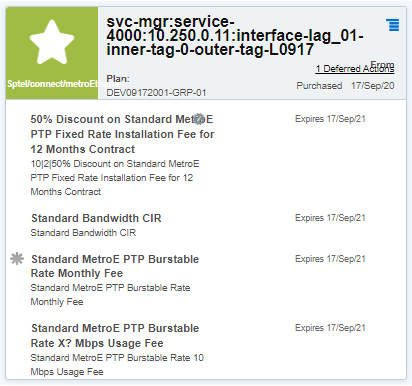

once manual actions is done, status of the Asset is changed

proceed with other actions following same procedure as before (moving PVT to next schedule date and run the utility pin_collections_process) until reach next manual action - Termination by CRM
similar to steps done for suspend service in Billing Care, select instead 'Terminate Service' from service account's Assets action menu and select date according the collections action schedule (Apr 5)

select 1 Deferred Action and execute to trigger termination action in BRM

status should change from Pending to Done

proceed with remaining actions until write-off (Recovery by CRM)
